A shot from Lesson 7 is assembled from the layers of the departments, but it lacks lighting and rendering. We handle the lighting with our own layer, and the rendering is described using USD primitives and split into two passes.
Light and render are also located in layers. Lights are in /World/lights, render settings and passes are in /Render.
1. Light with its layer
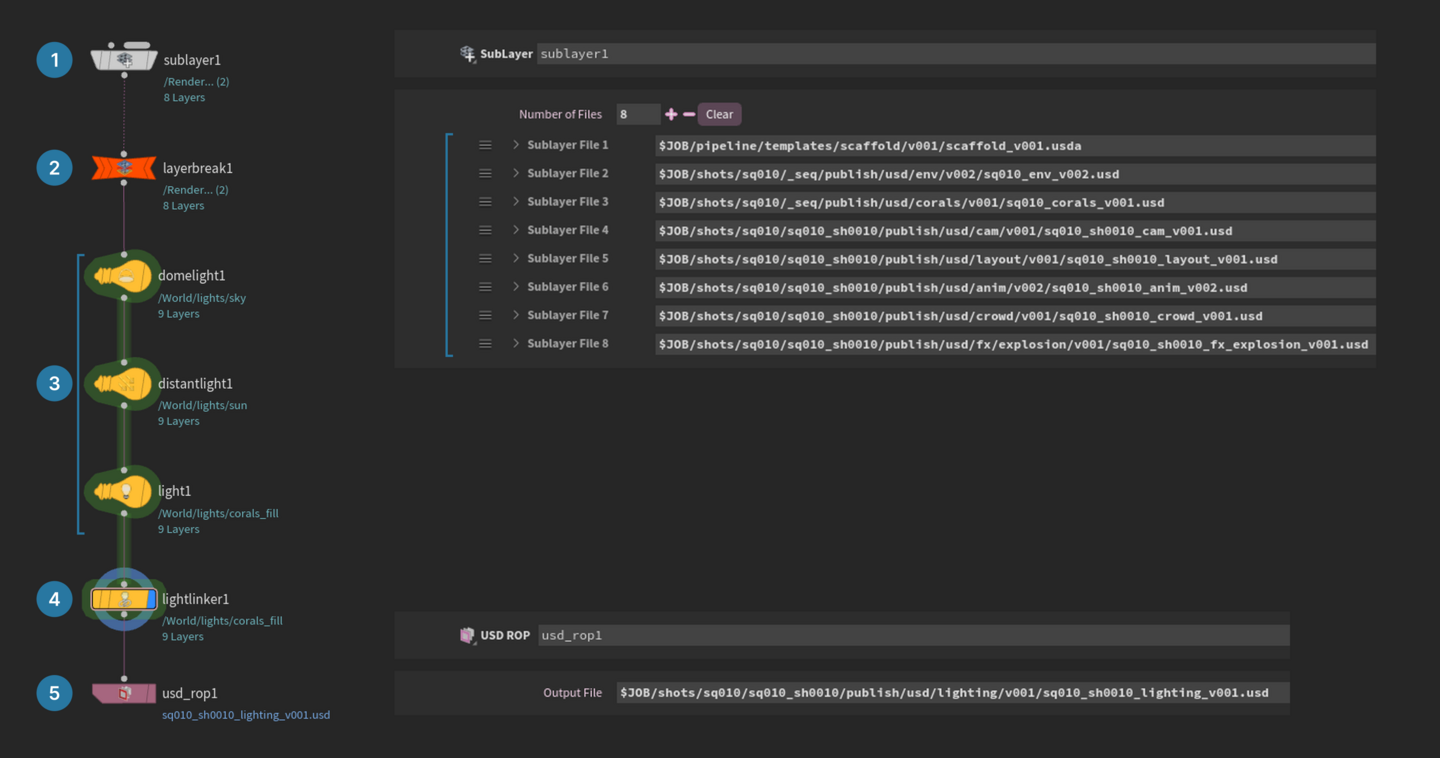
The light scene resides in the activities/lighting shot.
1. The SubLayer takes eight layers below the light in the root.
2. The Layer Break prevents anything from entering a layer above it.
3. Sky, sun, and coral accent lamps.
4. The Light Linker determines what the accent lighting shines upon.
5. The USD ROP writes the lighting layer v001 to the publish shot.
The lamp in USD is a primitive; its type indicates what kind of lamp it is. They are set as Dome Light, Distant Light, and Light.
1. The Primitive Path for all is in /World/lights.
2. The sky texture uses an HDRI from Houdini.
3. The sun’s direction is set by Rotate on the Transform tab.
4. The intensity of the auxiliary light is higher than the sun’s, so its light fades with distance.
The lighting only needs corals.
1. Drag corals_fill from the Light List into Rules.
2. From Geometry, place it into the /World/env/reef rule.
3. The rule has been recorded on the lamp itself.
This rule is called light linking; without it, the lamp shines everywhere. On the lamp, it is recorded as a collection—a list of primitives under its own name.
In v002, we remove the sun, dim the lighting, and hide the crawler.
1. The new Configure Primitive hides it before USD ROP.
2. The path to the crawler is in Primitives.
3. Check the Visibility box and select Invisible.
The visibility attribute hides the primitive along with everything inside it—in the viewport and in the render.
2. Rendering via USD Prims
The render scene writes the shot and light layers v002 into activities/render, while the USD ROP outputs the render layer v001. It is placed as the first line in the root.
The pass references the settings, the settings reference the file, and the file references the channels.
1. RenderVar is the image channel (AOV)—our beauty pass.
2. RenderProduct is the frame file.
3. RenderSettings is the camera, resolution, and file list.
4. RenderPass is a shot component for a separate render.
Render Var creates the channel /Render/Vars/beauty.
1. Set the Data Type to color4f, a color with an alpha channel.
2. Set the Source Type to LPE, and in the Source Name, write C.[LO].
3. On the Husk tab, write beauty in the Name and set the Format to color4h.
The LPE line describes the light ray path. C.[LO] means from the camera, through any bounces, to the lamp or light source—in other words, all the light in the frame.
The effects remain the same, except for the paths.
1. In Render Product Sampling Behavior, set Sample Frame Range and the shot frames.
2. In Ordered Render Vars, set the beauty channel.
3. In Product Name, the path starts from $RENDER, and $F4 is the frame number.
4. In Render Settings, under Ordered Products, set this file, the shot camera, and the width to 2048.
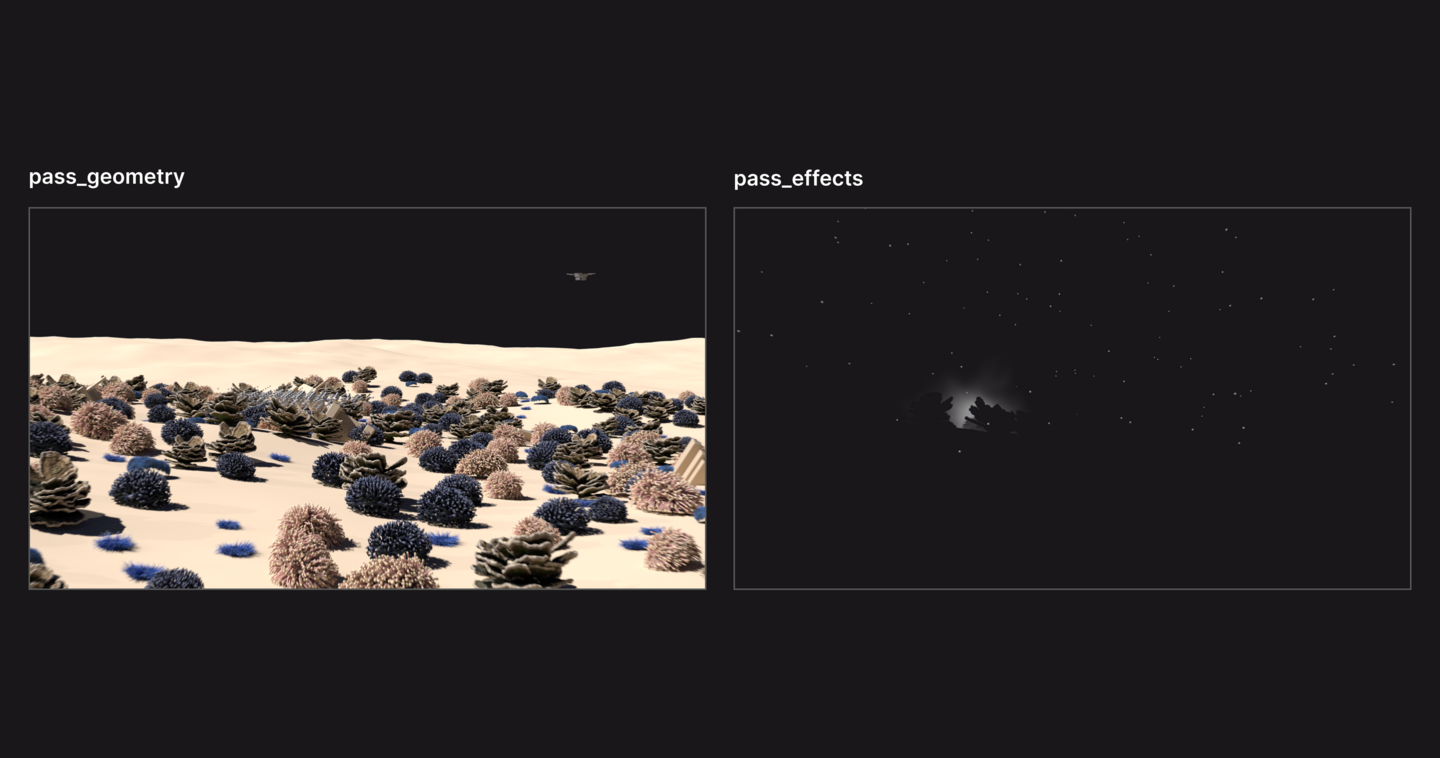
The Render Pass dictates which elements will be included in the pass. The pass_geometry includes everything except effects.
1. In Pruned Objects, we write /World/fx; effects are completely excluded from the render.
2. In Render Source, we use its settings_geometry.
In pass_effects, only the explosion and sparks remain. 1. In Matte Objects, we enter /World/env /World/characters /World/vehicles. The mask covers what is behind it, and its alpha is zero. 2. In Pruned Objects, the coral lighting, reef, here is the mask.
The pass doesn’t erase anything in the shot. It only tells the render what to take, what to remove, and what to mask.
3. Launching the render
Rendering from the assembly scene, which includes a SubLayer with the root shot and a USD Render ROP.
1. Set the Valid Frame Range to Render Frame Range From Stage, using frames from the root.
2. Specify the path in the Render Pass.
3. Use a Python expression in the Render Settings; this expression retrieves the renderSource from the pass and outputs its settings.